

The 30-Second Summary
- The Problem: A cluttered calendar isn't just stressful—it’s a signal that your time isn't aligned with your priorities.
- The Solution: A "Calendar Reset" that clears the junk and proactively carves out space for your team.
- The Goal: To move from reactive scheduling to a high-integrity cadence of 1:1s with team members, peers, and cross-functional leads.
Want to add one-to-ones to your management practice, but your calendar is a nightmare? This quick start guide will help you clear your calendar and make space for what matters: one-to-ones with your team, your peers, and your cross-functional colleagues.
Not sure what one-to-ones are or how they’ll help you? Check out the lessons I’ve learned from 1,000+ one-to-ones.
Ready to remake your calendar? Here are the supplies you need:
- Your calendar
- A scratch pad for making notes
- A shareable spreadsheet (Use my 1:1's Calendar Template)
Phase 1: Clear the clutter
Choose your reset date
A messy calendar is a difficult place to wedge in new habits. Choose a start date two weeks out. This gives you a clean slate to build your new management cadence.
The Calendar Audit
The Bucket List Audit
Scroll through your current weeks. Does your time reflect your priorities? Most manager calendars fall into four buckets:
- The Unmoveables: 1:1s with your manager, All-Hands, and critical team syncs.
- The Strategic Reschedulables: 1:1s with your team and peers.
- Personal Operating Time: Lunch, deep-work blocks, and reflection time.
- The Calendar Junk: "FYI" invites, office hours you never attend, and "Awareness" meetings.
Calendar clear? Now it’s time to figure out what’s important.
The "No" Phase
Delete the junk. If it's an impersonal "FYI meeting" or a generic office hour, remove it. You need this space for people.
Phase 2: Identify the Important
Now use your scratch pad to note the “reschedulables” you want to slot in after making time for your team. Here’s what my list looks like:
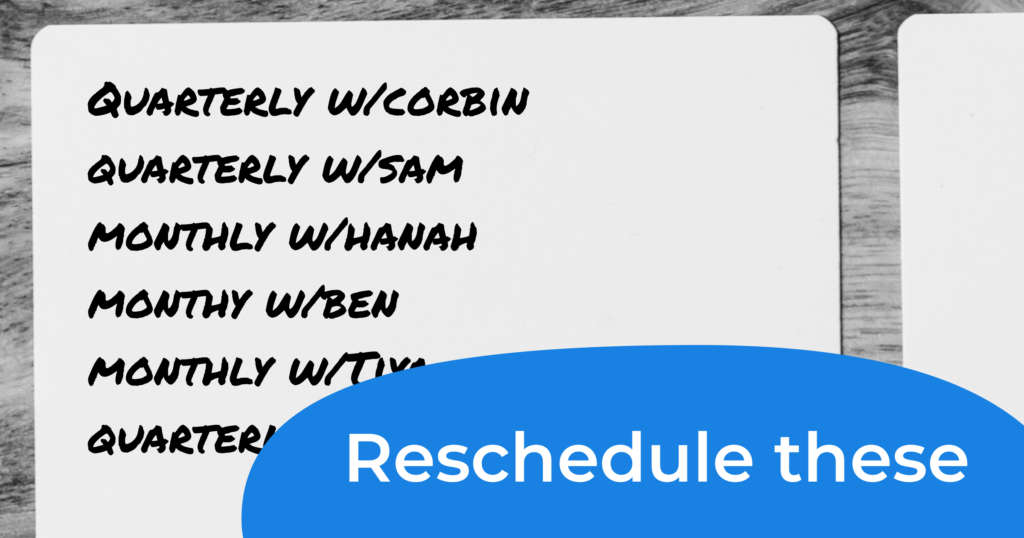
As you note each reschedulable, ask yourself “Am I meeting with this person at the right cadence?” Maybe they’re a close ally you should be meeting with more often. Maybe they’re a former report who you met with monthly when they first departed, but they need less support now. Note these changes.
Once you have a list with proposed cadences, delete those standing meetings from your calendar. You’re ready to move to the next step.
The "People" Priority List
Note the meetings that matter. As you do, ask: "Is this the right cadence?"
Mistake 1: Ranking indirect reports above cross-org peers. (Understanding the business is your job; don't skip peer syncs.)
Mistake 2: Putting PM and Engineering partners at the bottom. (These are your operational allies; move them up.)
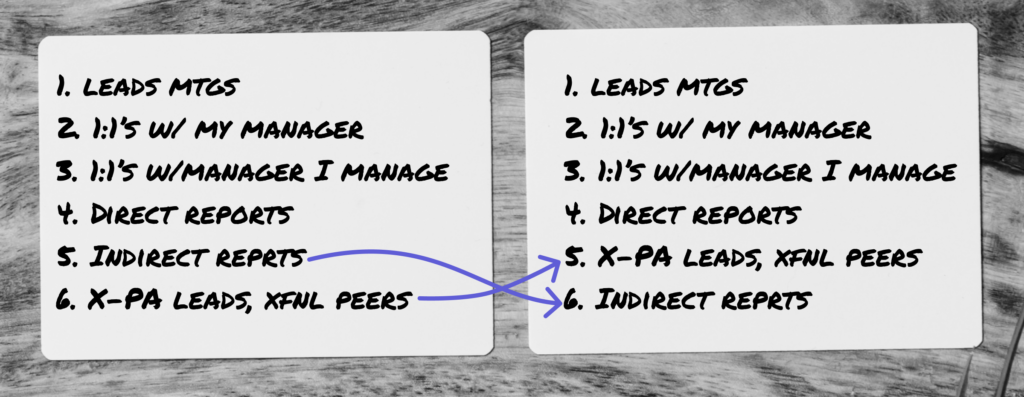
Got your ranked list? Now you’re ready to make a schedule.
Set aside time that works for you and your team
Now that you have an idea of where the clear spots are in your month, it’s time to set aside time for one-to-ones and get colleagues on your calendar.
- Create the calendar entries
- Invite team members to choose meeting times
- Confirm the schedule
Step 2: Set Your Cadence
Architect Your Calendar Entries
Create recurring 30-minute placeholders for your 1:1s.
- Check the Load: If you can't fit your 1:1s into a week, you may have too many direct reports. Consider bi-weekly sessions and discuss succession planning with your manager.
- The 50% Rule: Create at least 50% more slots than you have team members. If you have 10 reports, set 15 slots. This prevents "calendar Tetris" and ensures everyone gets a time that works for them.
- Batch Your Energy: Group 1:1s in blocks to reduce context-switching.
- Know Your Flow: If you aren't a morning person, don't host 8 AM 1:1s. Be your best self for your team.
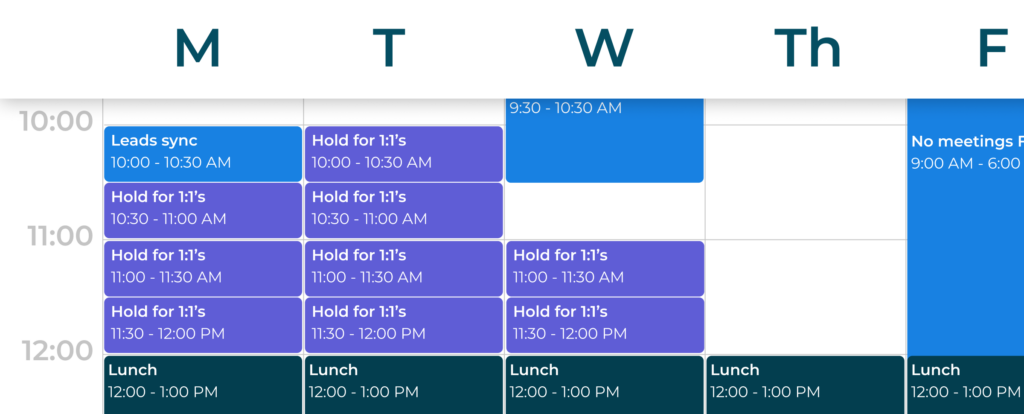
Strategic considerations for your 1:1's calendar
Monday vs. Friday: Choose Your Focus
- Beginning of the week: Ideal for tactical planning and setting the week's trajectory, though they may lack "real-time" data from the current week.
- End of the week: Superior for reflection, feedback, and "post-mortem" reviews, but can feel too late to influence the current week's outcomes.
The "Headspace" Variable
- Not all 1:1s are created equal. Meetings with your manager often require heavy pre-read preparation, while meetings with a high-performing report might be a lighter sync.
- Pro-tip: Audit your list and block 15 minutes of "Buffer Time" before high-stakes sessions to ensure you aren't just showing up, but actually leading.
Step 3: Send & Confirm
Step 3: Send & Confirm
Invite the Team to Choose
Transfer your 1:1 slots to your spreadsheet and invite the team to sign up.
Option A: For an established team
"Hi team, we're resetting our 1:1 cadence starting [Date]. Please head to the spreadsheet and sign up for a slot that works for your schedule by EOD Friday." [Use this 1:1's Scheduling Template]
Option B: For a new team
"Hi team, I’m launching a new practice: weekly 1:1s. This is your dedicated 30 minutes for us to align, tackle roadblocks, and focus on your career growth. Please sign up for a preferred slot on the spreadsheet below." [Use this 1:1's Scheduling Template]
Finalize and Lock in the Schedule
Once the team has submitted their preferences, it’s time to move from "planning" to "active."
- The Rule of Three: Aim to group your 1:1s to preserve your "maker time," but avoid booking more than three in a row. Empathy and active listening are high-energy tasks; capping your blocks prevents "meeting fatigue."
- The Final Handoff: Since you already created the calendar placeholders, simply add the team member’s name to their chosen slot. This converts the "hold" into a formal commitment.
- The Close-Out Email: Once the calendar is locked, send a quick announcement to the team. This signals that the system is live and the expectations are set.
Subject: 1:1 Schedule Confirmed
Hi team, our 1:1 schedule is now finalized and on your calendars starting next week. These sessions are your dedicated time for support, feedback, and career growth. Looking forward to our first sync!
The Final Word: Relax
Building a management cadence is a heavy lift once, but it pays dividends every week after. Once these are on your calendar, they become the heartbeat of your team culture.